📷 A Photo Is More Than Just an Image
Most social media users see photos as a simple way to share moments from their lives. But online, every image you post can reveal far more information than meets the eye.
A photograph is not just a picture. It can also contain technical data, visual clues, and contextual information that may reveal details about your location, habits, and personal life.
Pay particular attention to these details:
- EXIF metadata — the date, time, device model, camera settings, and potentially GPS coordinates embedded in an image file.
- Visual landmarks — buildings, signs, and other distinctive features that can help identify where a photo was taken.
- Reflections and backgrounds — mirrors, windows, documents, and objects in the frame that may reveal additional information.
- Post timing — patterns that may provide clues about a person's daily routine, habits, and regular routes.
- Social connections — tags, shared photos, and comments that can help reveal someone's social circle.
Social networks differ in how they handle original image metadata. Some platforms automatically remove certain information when processing uploaded photos. However, when you share original images through cloud services, email, or file transfers, metadata such as GPS coordinates may remain intact.
The Electronic Frontier Foundation (EFF) warns that photo metadata can expose information about the device used, the time an image was captured, and its location.
Even after technical metadata is removed, the image itself may still contain visual clues that suggest where it was taken.
📍 Geolocation: How a Photo Can Reveal Your Whereabouts
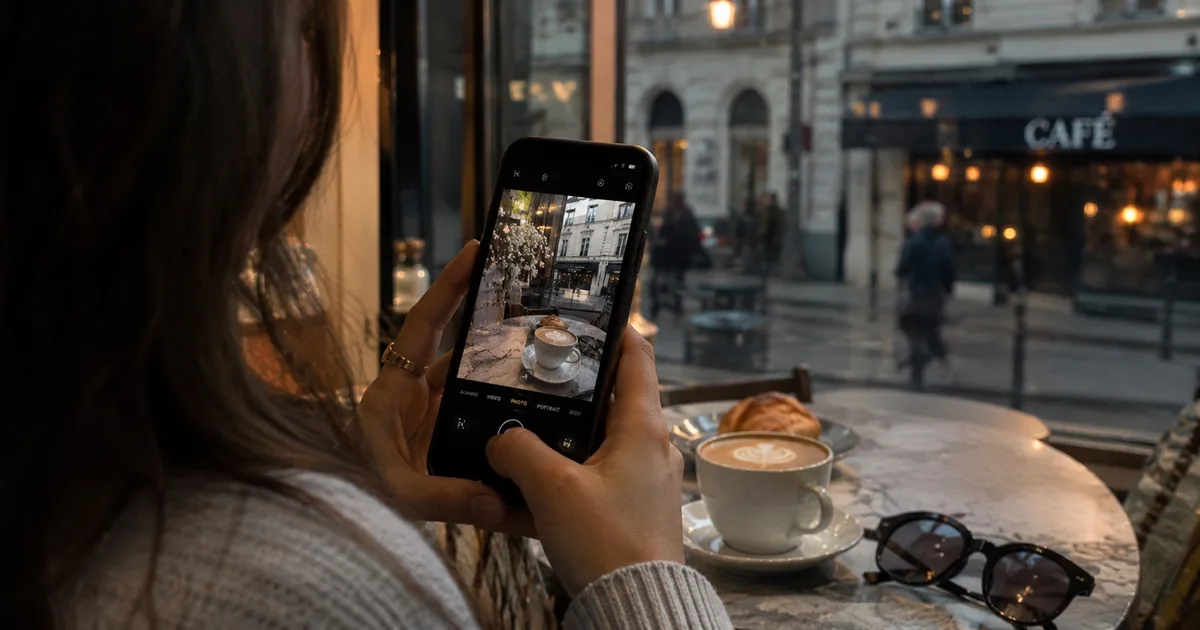
Imagine someone posts a photo of their morning coffee by a window. It seems harmless at first glance, but the background reveals:
- A distinctive building.
- A shop sign.
- Part of a street.
- A bus route number.
- Features of the surrounding landscape.
By comparing these details with publicly available maps, street-level imagery, and other geographic information, someone could try to identify where the photograph was taken.
What could this mean for privacy?
If someone regularly posts photographs from the same locations, others may gradually piece together:
- Where they work.
- Where they study.
- Where they spend their free time.
- Which places they visit regularly.
- Where they might live.
Photos shared in real time pose a particular privacy risk because they may reveal someone's current whereabouts.
And even if a photo has no GPS coordinates, identifying its location may still be possible.
🤖 A New Privacy Threat: AI Can Locate Photos Even Without GPS
In the past, identifying where a photograph was taken often began with checking its EXIF metadata for GPS coordinates.
Today, removing those coordinates is no longer sufficient to eliminate the risk of location identification.
Modern multimodal artificial intelligence models can analyze visual details, recognize geographic patterns, and use contextual reasoning to estimate where an image was captured.
A research paper published in October 2026 demonstrates how significant this capability has become.
In the study Not Where You Think: Protecting Location Privacy Against Reasoning-Based Geolocation, researchers examined the ability of AI models to identify the locations of ordinary photographs.
The researchers evaluated a technique called GeoTrace using a dataset of 525 images covering urban, residential, natural, and human-centered scenes.
The dataset excluded famous landmarks and direct location indicators, making the task more challenging than identifying a widely recognized monument.
The results showed that the tested models could locate a proportion of photographs within 1 kilometer of their actual location:
- Gemini-3-Flash — 25.71% of photographs.
- GPT-5-mini — 16.95% of photographs.
These results were obtained using the researchers' GeoTrace approach under specific experimental conditions. They do not represent universal accuracy rates for these models, and performance may vary with different images, methods, and settings.
Nevertheless, the findings illustrate an important privacy concern: removing GPS metadata does not necessarily prevent a photograph from revealing its location.
The researchers also found that small, distinctive visual details can play an important role in precise geolocation.
This means that seemingly insignificant objects in a photograph may contribute to an AI model's ability to infer where it was taken.
Image-based geolocation is not a new technology. However, advances in multimodal AI and visual reasoning create additional challenges for protecting location privacy.
How can you protect your privacy?
Removing EXIF metadata remains a useful precaution, but it provides only partial protection.
Before sharing photographs, examine the visible background, avoid exposing sensitive locations, and consider whether distinctive details could reveal information you would prefer to keep private.
🧩 The Mosaic Effect: When Individual Photos Reveal the Bigger Picture of Your Life
A single photograph may reveal very little about someone's personal life.
But dozens of photos published over several weeks or months can form a much more detailed picture.
This is sometimes described as the mosaic effect: individually insignificant pieces of information become more revealing when combined.
For example, a photograph from a café might show only a cup of coffee and part of a street. Another photograph might reveal a nearby office building. A third could show that the same person visits the area at approximately the same time every weekday.
Individually, these details may appear harmless. Together, they could suggest a regular routine or connection to a particular location.
Over time, publicly shared photos may help reveal:
- Places a person visits frequently.
- Possible work or study locations.
- Daily routines and recurring travel patterns.
- Periods when someone may be away from home.
- Social relationships and personal interests.
The UK's Information Commissioner's Office (ICO) discusses the mosaic or jigsaw effect in its guidance on anonymisation and linkability.
The underlying principle is important: information that appears harmless in isolation can become personally revealing when combined with other available information.
⚖️ What Are the Real Risks?
The personal information revealed through photographs can potentially be misused in several ways.
Digital stalking — someone may use photographs, timestamps, and public posts to monitor another person's whereabouts, habits, or movements.
Doxxing — photographs may contribute to the collection and public disclosure of private information, such as a home address, workplace, or personal connections.
Targeted phishing — scammers may use details from photographs and social media activity to create more convincing, personalized fraudulent messages.
Revealing when you're away from home — real-time vacation photographs or repeated travel posts may suggest that a home is temporarily unoccupied.
Deepfake creation — publicly available photographs can potentially be misused to generate fabricated images or videos depicting someone's likeness.
Biometric risks — facial recognition technologies can potentially be used to identify people in photographs or connect images of the same person across different sources.
These risks do not mean that every photograph will be exploited or that all location-identification attempts will succeed.
However, they demonstrate why sharing personal information online deserves careful consideration.
For further guidance, the US Federal Trade Commission (FTC) provides information about phishing scams, image-based abuse and AI-generated deepfakes, and sharing personal content safely online.
💚 How to Protect Yourself: A Practical Checklist
You do not need to stop sharing photographs online to improve your privacy.
A few practical precautions can significantly reduce the amount of personal information your images may expose.
1. Turn off camera location access
If you do not need geographic coordinates embedded in every photograph, consider disabling location access for your camera.
On an iPhone:
Settings → Privacy & Security → Location Services → Camera → Never
This prevents the Camera app from adding location information to newly captured photographs.
It does not automatically remove location information from photographs you have already taken.
2. Remove location information before sharing
On an iPhone, you can exclude location metadata when sharing a photo:
Photos → Select Photo → Share → Options → Turn Off Location
This allows you to share the image without including its saved location information through the supported sharing workflow.
For existing photos in your library, you can also review and remove stored location information.
Apple provides detailed instructions in its official guide: Manage location metadata in Photos.
3. Check EXIF metadata
Before sending original photographs as files, review their metadata.
Pay particular attention to:
- GPS coordinates.
- Capture date and time.
- Device and camera information.
- Other technical details that may be unnecessary for the recipient.
Remember that different applications and sharing methods handle metadata differently.
Do not assume that every service automatically removes sensitive information.
4. Examine the background
Before uploading a photograph, look carefully at what is visible behind the main subject.
Watch for:
- House numbers and street signs.
- Documents, identification cards, and screens.
- School or workplace names.
- Vehicle registration plates.
- Reflections in windows and mirrors.
- Distinctive buildings and recognizable locations.
Cropping or obscuring sensitive information may help reduce unnecessary exposure.
5. Avoid sharing your location in real time
Consider posting photographs after leaving a location rather than while you are still there.
This is particularly useful when sharing images from your home, workplace, regular destinations, or while traveling.
Delaying a post may reduce the risk of exposing your immediate whereabouts.
6. Limit access to your social media profiles
Review the privacy settings of your social media accounts.
Check:
- Who can view your photographs and posts.
- Who can tag you in photos.
- Whether your location is displayed publicly.
- Who can see your friends or connections.
- Whether older posts remain publicly accessible.
Privacy settings can reduce exposure, but they cannot guarantee complete control over content once it has been shared.
7. Manage your digital footprint
Periodically review your old photographs, posts, and public profile information.
Remove information you no longer want to share, review connected applications, and protect your accounts using strong, unique passwords and two-factor authentication.
Be aware that deleting a photograph does not guarantee that every previously shared or saved copy disappears.
The FTC's online safety guidance explains why it is important to consider what you share before posting.
🔐 Think Before You Post
Before publishing a photograph, ask yourself two simple questions:
What do I want to share?
What could someone else learn from this image?
The difference between those two answers can be significant.
A photograph intended to capture a pleasant moment might also reveal a location, a routine, an address, or a personal connection.
It is almost impossible to avoid leaving a digital footprint online. However, understanding what your photographs may reveal, reviewing privacy settings, and handling personal information carefully can help reduce unnecessary risks.
Digital footprints can reveal far more than we might expect.
That is why at Axon OSINT, we focus on the responsible use of publicly available information, the protection of personal data, and the promotion of digital safety.
Our goal is to help people better understand the information they expose online and the importance of using open-source intelligence responsibly.
📚 Sources and Further Reading
The following sources provide scientific evidence, technical explanations, and official privacy recommendations supporting the topics discussed in this article.
Shi, S., et al. (2026). Not Where You Think: Protecting Location Privacy Against Reasoning-Based Geolocation. Research preprint, arXiv:2610.30439.
https://arxiv.org/abs/2610.30439Apple Support. Manage location metadata in Photos. Official instructions for reviewing, removing, and controlling location information in photographs.
https://support.apple.com/en-ie/guide/personal-safety/ips0d7a5df82/webElectronic Frontier Foundation (EFF). Attending a Protest — Surveillance Self-Defense. Guidance addressing photograph metadata, location privacy, and safer image sharing.
https://ssd.eff.org/module/attending-protestInformation Commissioner's Office (ICO). How do we ensure anonymisation is effective? Guidance explaining linkability, re-identification, and the mosaic effect.
https://ico.org.uk/for-organisations/uk-gdpr-guidance-and-resources/data-sharing/anonymisation/how-do-we-ensure-anonymisation-is-effective/Federal Trade Commission (FTC). Protect yourself from phishing scams. Advice on identifying phishing attempts and protecting personal information.
https://consumer.ftc.gov/consumer-alerts/2025/04/protect-yourself-phishing-scamsFederal Trade Commission (FTC). Image-Based Abuse: What To Know and Do. Guidance on image-based exploitation, including AI-generated deepfakes.
https://consumer.ftc.gov/articles/image-based-abuse-what-know-and-doFederal Trade Commission (FTC). Heads Up: Stop. Think. Connect. Online safety guidance addressing social media privacy and responsible content sharing.
https://consumer.ftc.gov/articles/heads-up