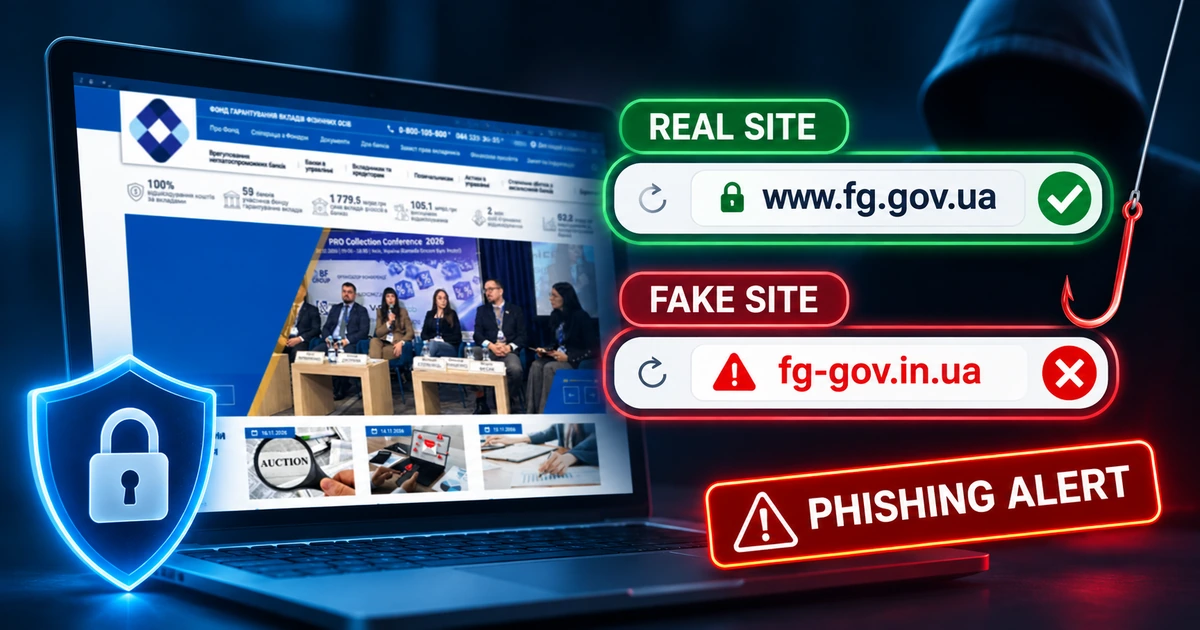
A familiar logo. An official-looking email. A website that looks almost identical to the real one. Sometimes, that is all it takes to convince someone to trust a scam.
Cybercriminals increasingly exploit the reputation of banks, government agencies, and financial institutions to trick people into revealing sensitive information.
Their websites may look legitimate. Their emails may contain official logos, familiar terminology, and convincing explanations.
But behind that appearance, the goal may be to steal your personal information, gain access to your accounts, or take your money.
A phishing campaign reported in Ukraine in November 2026 provides a clear example of how these attacks work — and why everyone should understand how to recognize them.
🚨 A Real Case: Fraudsters Impersonate Ukraine's Deposit Guarantee Fund
On November 14, 2026, Ukrainian financial news outlet Minfin reported a warning from the Deposit Guarantee Fund of Ukraine (DGF).
According to the report, cybercriminals were sending phishing emails that appeared to originate from the Fund.
The attackers used the institution's identity and created websites with addresses resembling its legitimate domain.
One example identified in the warning was:
✅ Official website:
www.fg.gov.ua
❌ Reported phishing domain:
fg-gov.in.ua
At first glance, the addresses may appear related.
However, they represent entirely different domains.
The Deposit Guarantee Fund stated that its official website is www.fg.gov.ua and that its corporate email addresses use the fg.gov.ua domain.
The institution also warned that it does not organize lotteries or prize draws or offer special deposit arrangements to citizens.
Source: Minfin, November 14, 2026 — Fraudsters impersonate Ukraine's Deposit Guarantee Fund.
This case illustrates a broader threat: attackers do not need to compromise a legitimate institution's website to deceive its customers.
Sometimes, creating a convincing imitation is enough.
🧩 How Does This Type of Phishing Work?
Phishing is a form of social engineering in which criminals impersonate trusted organizations or individuals to obtain sensitive information or persuade victims to perform harmful actions.
A typical attack may involve several stages.
1. Impersonating a trusted institution
Criminals choose an organization that people already recognize.
Possible targets for impersonation include:
- Banks and financial institutions.
- Government agencies.
- Deposit guarantee organizations.
- Tax authorities.
- Payment providers.
- Delivery companies.
- Online marketplaces.
The attackers may copy official logos, website layouts, terminology, and visual branding.
Their goal is to make the message appear credible before the recipient examines it carefully.
2. Creating a misleading website address
The attackers register a domain that resembles the legitimate organization's website.
For example:
Legitimate domain:
fg.gov.ua
Reported fraudulent imitation:
fg-gov.in.ua
The second address contains familiar elements, including the letters fg and the word gov.
However, it does not belong to the same domain.
This technique is commonly associated with lookalike domains and domain spoofing.
Attackers may also use:
- Additional words or characters.
- Hyphens inserted into familiar names.
- Different domain extensions.
- Subdomains designed to create confusion.
- Characters that visually resemble Latin letters.
A domain name can look convincing without being legitimate.
Important: A website using HTTPS or displaying a padlock icon is not automatically trustworthy. HTTPS protects the connection; it does not prove that the organization operating the website is genuine.
3. Sending a convincing message
Once the fake website is ready, attackers may distribute phishing links through:
- Email.
- SMS.
- Telegram.
- WhatsApp.
- Social media messages.
- Fake advertisements.
The message may claim that the recipient needs to verify an account, confirm personal information, receive compensation, or prevent an account restriction.
These are common phishing scenarios. They are not all confirmed elements of the specific Deposit Guarantee Fund campaign.
4. Creating urgency
Fraudsters frequently use psychological pressure.
A suspicious message might say:
Your payment requires urgent confirmation. Verify your information immediately to avoid delays.
The purpose of this type of message is to make the recipient act before checking whether the request is legitimate.
Urgency is not proof of fraud, but unexpected pressure to provide sensitive information is a warning sign.
5. Collecting sensitive information
If the recipient opens the fake website, they may encounter a form requesting:
- Full name and contact details.
- Bank card number.
- Card expiration date.
- CVV or CVC security code.
- Online banking credentials.
- Email password.
- One-time verification codes.
Information entered into a fraudulent form may be transmitted directly to the attackers.
In some cases, phishing campaigns also distribute malicious files or attempt to install harmful software.
🔍 Seven Warning Signs of a Phishing Website
Recognizing phishing does not require advanced technical knowledge.
However, it does require attention to several important details.
1. The website address is slightly different
Always examine the complete domain name.
An extra hyphen, unfamiliar extension, or additional word may indicate that you are visiting an imitation rather than the legitimate website.
Remember that the relevant domain is not necessarily the first familiar name appearing in the address.
For example:
bank.example.com
and
bank.example.com.fake-site.test
are not controlled by the same domain owner.
In the second example, the actual parent domain is fake-site.test.
2. The email sender does not match the organization
An email may display the name of a legitimate institution while being sent from an unrelated address.
Check the complete sender address, not just the displayed name.
However, even an apparently correct sender address does not guarantee authenticity because email sender information can sometimes be spoofed or an account may be compromised.
3. The message requests confidential information
Be especially cautious if an unexpected message asks for:
- Banking passwords.
- Card security codes.
- One-time passwords.
- Account recovery codes.
- Copies of identity documents.
Never provide sensitive credentials through a link received in an unexpected message.
4. The message creates unnecessary pressure
Statements such as these deserve additional scrutiny:
- "Your account will be blocked immediately."
- "You must confirm your details today."
- "Your compensation will expire."
- "Your payment has been suspended."
Fraudsters often use urgency to discourage independent verification.
5. The website looks professional but cannot be verified
A professional design does not prove legitimacy.
Logos, photographs, and visual layouts can be copied.
Always verify the domain independently.
6. The website asks for an unexpected payment
Be cautious if someone claiming to represent an institution asks you to pay a fee to receive compensation, unlock an account, or accelerate a payment.
In the Ukrainian Deposit Guarantee Fund case, users were specifically advised to obtain guaranteed compensation through the Fund's official channels and designated agent banks.
7. The message discourages independent verification
Legitimate requests should be verifiable through trusted, independent communication channels.
If a message insists that you must act only through its embedded link, treat that as a reason for caution.
🛡️ How to Protect Yourself: A Practical Checklist
The following precautions can help reduce your exposure to phishing and fraudulent websites.
✅ 1. Open official websites independently
If you receive an unexpected email from a bank or government institution, avoid opening its embedded link.
Instead:
- Open your browser.
- Enter the institution's verified website address yourself or use a trusted bookmark.
- Sign in through its official website or application.
- Check whether the requested action is genuine.
This reduces the likelihood of being redirected to an imitation website.
✅ 2. Check the complete domain
Pay attention to:
- The actual domain name.
- The domain extension.
- Extra words and symbols.
- Unexpected subdomains.
- Unusual characters.
Do not rely solely on the appearance of a website.
✅ 3. Never share verification codes
One-time passwords and confirmation codes are security credentials.
Do not provide them to someone who contacts you unexpectedly, even if they claim to represent your bank or another trusted organization.
✅ 4. Enable multifactor authentication
Use multifactor authentication wherever it is available.
For important accounts, consider using passkeys or phishing-resistant security keys when supported.
Authentication methods provide different levels of protection, and no single measure guarantees complete security.
✅ 5. Keep your devices updated
Install security updates for your operating system, browser, and applications.
Updates can reduce exposure to known vulnerabilities that attackers may exploit.
✅ 6. Use strong, unique passwords
Avoid reusing the same password across different services.
A reputable password manager can help you generate and store unique credentials.
✅ 7. Verify unexpected requests through another channel
If someone claims to represent your bank, contact the bank using the telephone number displayed in its official application, on your bank card, or on its verified website.
Do not rely on a phone number supplied in the suspicious message.
🚑 What Should You Do If You Have Already Clicked a Phishing Link?
The appropriate response depends on what happened after you opened the link.
Simply opening a suspicious page does not necessarily mean your accounts or device have been compromised.
However, providing credentials, downloading files, or authorizing payments can create additional risks.
Situation 1: You opened the website but entered nothing
If you only opened the page:
- Close the suspicious website.
- Do not download any files or install applications from it.
- Make sure your browser and operating system are updated.
- Review your device for unexpected downloads or security warnings.
- If you suspect malicious activity, run a security scan using reputable software.
Avoid returning to the suspicious website to investigate it yourself.
Situation 2: You entered your email password
If you entered your password on a suspicious website:
- Open the legitimate service independently.
- Change the compromised password immediately from a trusted device.
- Sign out of other active sessions where possible.
- Enable multifactor authentication.
- Check account recovery information, forwarding rules, and connected applications for unauthorized changes.
- Change the password on any other account where you reused it.
If attackers gain access to your email, they may attempt to reset passwords for other online services.
Situation 3: You entered your bank card information
Contact your bank immediately.
Explain that you may have entered your card details on a fraudulent website.
Ask the bank whether the card needs to be blocked and replaced.
Also:
- Review recent transactions.
- Report any unauthorized payments.
- Follow the bank's instructions for securing your account.
- Preserve transaction details and related communications.
If you shared online banking credentials, inform the bank about those as well.
Do not assume that changing your online banking password is sufficient when the card's payment details have also been exposed.
Situation 4: You provided a one-time verification code
Contact the affected financial institution or account provider immediately.
A one-time code may be used to approve an action, depending on the service and the specific authentication process.
Ask the provider to review recent activity and take appropriate protective measures.
Situation 5: You downloaded a suspicious file
If you downloaded and executed a potentially malicious attachment:
- Stop interacting with the suspicious file.
- Disconnect the affected device from the network if you suspect active malware.
- Use a trusted, updated security tool to inspect the device.
- Contact qualified technical support if necessary.
- Change important passwords from another trusted device if compromise is suspected.
If the device is used for work, notify your organization's IT or security team promptly.
🧾 Preserve Evidence and Report the Incident
If you encounter a fraudulent website or suspicious message, preserving information can help with subsequent reporting and investigation.
Useful evidence may include:
- The suspicious email.
- The sender's complete email address.
- The website address.
- Screenshots of the message and website.
- Dates and times.
- Relevant payment or transaction details.
- Records of communication with the alleged organization.
Where possible, retain the original email in a format that preserves its technical headers.
However, do not reopen a dangerous attachment or revisit a phishing site solely to collect evidence.
Do not publish passwords, card details, identity documents, or other sensitive information when sharing evidence.
Reporting phishing in Ukraine
If you suspect that you have encountered online fraud in Ukraine, you can contact the Ukrainian Cyber Police.
Official website:
Official reporting information:
Cyber Police — Submit a Report
If money has been stolen, contact your bank immediately and report the incident to law enforcement.
If your case involves a specific government institution, you can also notify that institution through its verified official contact channels.
🧠 Why Do People Fall for Phishing?
Phishing does not necessarily succeed because someone lacks technical knowledge.
It often succeeds because attackers exploit normal human behavior.
A person may be concerned about:
- Losing access to their bank account.
- Missing an important government payment.
- Receiving a penalty.
- Losing money.
- Failing to respond to an urgent notification.
Cybercriminals design messages around these concerns.
They use familiar logos, recognizable names, and urgent language to make fraudulent requests appear legitimate.
This is why effective protection requires more than antivirus software.
It also requires the habit of verifying unexpected requests before acting on them.
🔐 The Most Important Rule: Verify Before You Trust
The November 2026 phishing campaign involving Ukraine's Deposit Guarantee Fund demonstrates how easily criminals can imitate the appearance of a trusted institution.
A convincing website does not necessarily belong to the organization it claims to represent.
An official logo does not authenticate an email.
And a familiar-looking domain can still lead to a fraudulent website.
Before entering personal information, making a payment, or providing a verification code, ask yourself:
Am I using the institution's genuine website?
Did I independently verify this request?
Why is this message asking me to act immediately?
A few moments spent checking these details may help prevent financial loss and unauthorized access to your accounts.
At Axon OSINT, we believe that understanding how digital threats operate is an essential part of protecting personal information and improving online safety.
Our focus is on responsible open-source intelligence, digital awareness, and helping people recognize the risks hidden behind seemingly legitimate online interactions.
Stay informed. Verify independently. Protect your digital identity.
📚 Sources and Further Reading
Minfin — November 14, 2026. Fraudsters impersonate Ukraine's Deposit Guarantee Fund. News report covering the phishing campaign, lookalike domains, and official warnings.
https://minfin.com.ua/amp/2026/11/14/185544657/Deposit Guarantee Fund of Ukraine. Official website of the institution referenced in the phishing warning.
https://www.fg.gov.ua/Ukrainian Cyber Police — Phishing Links. Recommendations for recognizing phishing websites and protecting online accounts.
https://cyberpolice.gov.ua/article/fishyngovi-posylannya-5283/Ukrainian Cyber Police — Protect Yourself from Fraud. Practical advice about fraudulent links, banking credentials, and responding to financial scams.
https://cyberpolice.gov.ua/protect_yourself_from_fraud.htmlUkrainian Cyber Police — Reporting Information. Official information about reporting suspicious online activity and cybercrime.
https://cyberpolice.gov.ua/ticket/Ukrainian Cyber Police — Recognizing Fraudulent Messages. Guidance about impersonation of government services, suspicious domains, and urgent requests.
https://cyberpolice.gov.ua/article/yak-rozpiznaty-shaxrajski-povidomlennya-pid-vyglyadom-spamu-ta-akczijnyx-propozyczij-3274